


Most of the people find it hard to earn revenue from blog or site using advertising programmes such as Google AdSense. This is a clear scenario because I myself also find it quite hard to earn good from advertising programmes.
In this post, I will discuss about how to diversified your income or revenue using different stream of source and several high paying programmes available on the web.
1. Do not put your eggs in single basket--divide it into smal groups:
First, if you really find it hard to earn from one single programme then you should consider Joinning Several Programmes available on the web. Some of the good programmes to join are affiliates programmes such as Text-Link-Ads and other publishers programmes such as Bidvertiser. By joinning in several programmes, you are actually earning revenues from several source and when all the revenues are added up, you are earning faster and more.
Several affialites to be considered are:
i. Text Link Ads
ii. Forex Affialiates
iii. Amazon
iv. e-bay
2. Create more sites or blogs:
When you have a single site/blog which earn you $1.00 per day, you can consider setting up more sites/blogs. For example, you have a site/blog which help you earn $1.00 per day. If you setup 10 sites/blogs, you are actually earning $10.00 per day and that is 10 times more revenue generated per day.
Note: This is a very effective way to generate more revenues and it is used by a lot of successful AdSense Pros.
3. Get More Traffic with Less Effort:
You do not need to be "crazy" to go to tell all the people around you that you have a site/blog and ask them to click the advertisements for you to help you earn more. You can tell the world about your blog very easily by joinning some Google Groups. Just posts some questions and ask for opinions or reviews. Then, you will discover that you suddenly get a lot of traffic to your blog/site. In addition, you no need to pay even a peny to join the Groups.
Best Google Groups To Join:
i. Blogger Help Group http://groups.google.com/group/blogger-help
ii. AdSense Help http://groups.google.com/group/adsense-help
iii. Blogger Community http://groups.google.com/group/share-blog
More tips to come...


This post is the Part 2 from the last post "Double AdSense Income". I will tell you about another two techniques I discovered.
4. Social Bookmarking Sites:
Another powerful techniques to get traffic and make more money from Google AdSense is using Social Bookmarking Sites. Social bookmarking sites are websites with a lot of topics and bookmarks. It works almost like pinging services.
Some Social Bookmarking Sites enable users to Submit Articles and some allow users to interact with each others. Social bookmarking sites are a great source of traffic. Thousands of people are using such service. Some people use it to "Bookmark" their favourite sites, some just ant to share their ideas and opinions with people in the bookmarking sites, some people wish to share and help others and some want to get traffic to their blog from Social Bookmarking Sites.
There are hundreds and thousands of them on the internet. You do not need to find it your own, I have do some research and create a list for you.
- Del.icio.us
- Fark
- Yahoo My Web 2.0
- Backflip
- Bean Rocket
- BlinkList
- Blogmarks
- BuddyMarks
- CiteULike
- Clipfire
- Cluebacca
- Diigo
- Feedmarker
- Frassle
These social bookmarking sites have great source of topics and traffic. Use them properly and get the traffic to your blog.
Note: The list is quite long and if you are going to submit to them 1-by-1, it is quite time-consuming but it really wort your effoet to do so. Don't be lazy. ;-)
5. Creating Reader's Favorite Contents:
I found that when I wrote new posts to my blog, the numbers of visits and time of visits will be different. Sometimes the number of subcription also changes when I create a new post.
I tried to find the favourite topics my readers like and try to write more. This way can help me get more readers and I can help them with the topics they have problem with.
So, try to get to know more about your readers. Create contents that are useful to them. This is mutual benefit because your readers get to solve their problems and you can get their subscriptions.
How Do I Get $3.00++ per day from Google Adsense?
It is quite easy but also quite tough and time-consuming. If you are willing to spend time sitting in front of your computer and do all the things I mentioned below, you can earn more than $3.00 per day. Trust me!
1. Join a lot of Forums.
Joining forums. You might think "Bullshit! Everyone knows about this.". You are right but not everyone are willing to do it. (I'm the one that is lazy to do it.)
I tried to join around 15 Google Groups and 5 forums. These forums are the source of my traffic and the source of clicks. In these forums, I can place my "Signature". In the signature, I will place the link to my blog. So, this can help people to find your blog and generate GREAT clicks on the AdSense Ads.
It is important that you find good forums with a lot of active users and enable you to use Signature for every reply you done in the forum. With a lot of active users, you can interact and get reply very fast. This indirectly help you to create good relationship and create your reputation in the forum.
**Try to be friendly, do not be rude and offensive. People will not visit your blog if you are rude and offensive.
Introduce yourself and your blog in the forums and this can help you get a lot of traffic to your blog.
Good Forums:
DigitalPoint Forum
Google Groups
Blogger Forum
2. Less Is More Technique
What is this technique? It means that you place less AdSense Ads on your blog and it can help you generate more earnings. Is this possible? Yes.
Google is very popular with the Smart Pricing technology. It is a technology that can hep Google earn more money but you get lower earning per click. Smart Pricing technology will arrange the Ads in the AdSense block from the most expensive Ads to cheaper Ads. So, the highest paying Ads will be the first in the AdSense block. With less AdSense block, you are actually getting clicks on higher paying Ads,. So, you will get a lot of earnings even though the clicks are less.
**Important : Less is more!!! If you are getting a lot of traffic and a lot of clicks but earnings are not very impressive, remove the AdSense Ads from your blog for 1 day to reduce Smart Pricing. Paste the 1 AdSense code again after 1 day. The more expensive Ads will appear and you can make more from every click.
This technique help me to double my AdSense Income. You can be the next to DOUBLE your AdSense Income too.
3. Ping! Ping! Ping!
No matter how good your blog is, no matter how good your articles/posts is, if you don't use proper technique to tell others about it, no one will know about it. So, I use Pinging Services.
This is a good way to get some visitors to your blog and read your posts/articles. Pinging Services are very good because you can tell all the people/bloggers in the pinging services about your blog and your posts. You are increasing visibility of your blog and gain more visitors.
If you decide to create a blog to earn money from AdSense and don't tell anyone about it, then you are wasting your time. You need to tell the world about your blog. This is the way to get clicks and make money from AdSense. Make your blog as popular as possible, the traffic will come automatically, your AdSense Income will also increase automatically.
So, make it a habit to ping your blog and ping your posts everytime you update it. Get the traffic and generate the most MONEY from Google AdSense.
*I will write more tips on my next post because it will be too long to write all of it in this post.
4 Tips to Increase CTRs:
Match your AdSense to your website:
You want your AdSense ads to appear as seamless as possible. Blend every aspect of AdSense ads to the theme/template of your website. Remember to remove the border of your Ads. Make your Ads as a part of your page. DO NOT make it too attractive that will tell people that it is an Ads. Try to insert it also in your Ads in your posts.
Eg: if your web site has a white background and the default color of your links is blue you will want to remove the border from your AdSense, make the background white, choose either a large rectangle as your ad format instead of a skyscraper or banner, because large rectangle is the best Ads format ever! It gets the most CLICKS!
Placement:
The place you put the AdSense ads is just as important. Take not of the Tips below:
•The more white space/empty space around your ads the better
•The closer to the top of the page the better.
•The closer the left of the page the betterFollow these concepts and I can assure you that you will see an increase in your AdSense click thru rate. (Easy!)
Tracking:
Tracking your CTRs is very important! Use the service provided in your Adsense Account, Channels! You need to know What is Attracting your Visitors before you get more bucks! Set up a few Google AdSense channels for the different ads on your site. Then just see which channels are working the best and stick to those.
That is it! Follow the Tips here and do it as soon as possible. You will be seeing your Revenue Skyrocket!!!
Enjoy!
Now, this is important.
If you have a website which contains some Password protected pages, like login account pages. then you must read what I have to say.
AdSense has a powerful crawler, which crawls through your blog/site and searches for the most repeated or similar contents. now when the search ends and the crawler provides the information to ad units. this is how you ads on adsense are targetted.
Now, if you have some password protected pages on your blog/site. What will happen? when adsense crawler reaches those pages, it obviously can't get access to those pages, thus your content on those pages is never been crawled and you wont get any relevant ads on those pages.
Now that is trouble, if there are no relevant ads, that means less clicks and that means less earnings.
So, What should you do ?
Google have recently launched a new feature called Site Authentication to take care of this problem. Using Site Authentication, you can give our crawler access to your login-protected pages by passing it information to log into your site.
To get relevant Ads on those pages, you can use Site Authentication to provide AdSense crawler with a test username and password. It's an easy process:
* log into your AdSense account.
* find the 'Site Authentication' link under the 'AdSense Setup' tab.
Once you've supplied us with a username, password, and a few other details, all you have to do is verify that you own the site through Google Sitemaps.
If you need additional help, feel free to visit Adsense Help Center. Once you've set up your authentication rule and verified ownership, it may take 1-2 weeks for Adsense crawler to visit your site again.
Your users will thank you, and so will the AdSense Crawler.
I've heard thousands of bloggers asking a way to place ads in between every post, so can get more attention of readers towards those ads and so get more click
Below is the Step by Step Guide on how to place Ad unit in Between your posts:
- Log into your Blogger account at http://www.blogger.com/ .
- Visit your blog's Template tab and click on the Page Elements link.
- Click Edit in the Blog Posts section.

- Check the box next to Show Ads Between Posts. You can then select how often you'd like your ads to appear, such as once after every post or once after every other post.

- Customize the ads and click on Save Changes when you're done.
Please note that right now, it's only possible to insert Google ads using this widget, and not AdSense for search boxes or referral units.
For more detailed instructions, please visit Blogger's Help Center. Lastly, don't forget to check out our AdSense optimization tips for ways to improve your ad performance.
When adsense ads appear on your page, leave them completely
alone.
REMEBER: NEVER CLICK YOUR ADS YOURSELF! YOU MIGHT BE BANNED FOREVER!
You might be tempted to tell your users to “click here” or support your
sponsors but if YOU ARE CAUGHT BY Google Adsense. You will be BANNED.
What Happen if you ae BANNED?
Everything will be over. You need to find other alternatives such as affiliates to earn revenue.
Google Adsense want people to click their ads because they are really interested in the ads. They don't want people click their ads because you tell them to do so in your site.
So, get your strategy right and be patience to earn revenue from Google Adsense.
I read some articles from the internet lately about AdSense. One of the articles is about increase your AdSense income.
From the article, I found that it mentioned about removing your AdSense Pub ID from the AdSense Ads for a few days. Then, paste your ID again to the AdSense Ads. This step can help to boost your AdSense Income. In the article, it mentioned that your AdSense Income can be increase because removing the ID can avoid AdSense Spider and thus avoid smart pricing.
* Smart pricing is a way Google AdSense lower the cost per click done on the AdSense Ads.
After a few days, you will need to paste the ID again and you will notice that your AdSense Income will increase a lot.
I don't dare to try to remove the ID. DO you dare?
If you have tried it, please tell me the results.

There are a lot of people using Blogger.com to create their blog. Indeed, Blogger.com isa good site offering Free service for blog.
Recently, I read a post on the internet about Blogger.com is sharing our AdSense revenue.
Some of you maybe using the "Add a page element" in Blogger.com to add AdSense Ads in your blog. This is a bad move because this function is editting your AdSense ID and thus Blogger.com can share the revenue you generate from your blog. You might get lower earnings.
Avoid using the "Add a page element" to add AdSense Ads to your blog. Go to your AdSense Account and generate the code there. Copy and paste the code into "Add a page element" in the "HTML/Javascript". This will avoid Blogger.com revenue sharing.
Do you always wonder why some people make a lot of money from Google AdSense but not you? What are their secrets to make money from Google AdSense?

No more Questions. A lot of people are making a lot of money from Google AdSense and that is a truth. You can make money from Google AdSense too and you need no secrets. I will tell you some simple optimization tips to help you make more from Google AdSense.
Optimization tips #1:
AdSense Ads placement is an important factor. You need to try different placements on your sites to get the best performance and earn more from Google AdSense.
Some optimized placements are:
Ads very near to the top of the page.
Ads in post.
Ads at sidebar.
Ads at post footer.
Ads Placement samples for:
Blogs
Websites
Optimization tips #2:
AdSense Ads formats. You need to use the best performing Ads formats to make the Ads help you earn clicks and money. If you use wrong Ads formats, then you will not make great money from Google AdSense.
Best Performing Ads Formats:
Large Rectangle
Wide Skycrapper
Skycrapper
Leaderboard
Button
Remember: It depends on how you place the Ads formats on your sites. Make the placements on your sites look tidy and well-organized. Don't force yourself to use the Best performing Ads formats on your sites if it really don't fit at all.
Optimization Tips #3:
Border and background color. Make the border and background color the same color so that the Ads blend perfectly into your sites. If your site's background color is "White" then you should use "white border and "white Ads background color".
*** Remember: Make the border "invisible", what I mean is make it the same color like the background color.
Optimization Tips #4:
Ads title and text colors. You will need to try out these colors yourself because you are the only person who can test the performance. The colors of Ads title and text can help you make large difference. Try it out properly and when you get the best performing colors, stay with it!
*** Remember: Make the "testing" in several days and try to make it as short as possible. Visitors will not want to see your sites keep on changing colors everyday.
Take a good attention on THIS POST if you are really serious into Adsense.
Ads Location:
"the middle, above the fold location perform best." Besides, if you have an article page with a long body of text, the bottom of that article is actually pretty successful.
Ads Formats:
The top three formats are the 336x280 ; the 300x250 medium rectangle; and 160x600 wide skyscraper. Additionally, wider ads formats are doing better than the other ones and the reason is that they actually take up fewer lines. With every additional line, you have a chance of losing that interested user. This means that Ads with fewer lines have higher success.
Ads Colors:
Pick colors that BLEND well with the site. Matches the background color and compliments the site. Make them feel like a part of the site. They give an example where a customer went from blended background to yellow, and clicks dropped 65%. This is what I always stress a lot. PAY MORE ATTENTION!!!
Ads Blindness:
Try not to make the colors stick out too much, readers may immediatly identify them as Ads and NOT even look at them. Also frequent readers may stop reading Ads so you could alternate positioning and colors to get their attention. The more you BLEND Ads in with the site, the less chance that ads blindness will occur.
Experiment:
this was a big theme in the webinar echoed by all experts. Use channels to test different colors, positioning, and formats to find out what works best. They show that you can more than double your revenue just by finding the right color, position, format combo.
Image Ads:If you want to maximize revenue they recommend turning them on. I personally disable them because according to other reports, Text Ads work better than Image Ads. Image Ads seem like you are telling user "I'm an Ads". So, it is NOT GOOD. You may increase your CPC, but you will probably decrease impressions over time.
Link Units:
Don't take up much space, and allows the user to refine what they're interested in. So if they may not be interested in specific ads on your page, they might be interested in a particular topic, and by clicking on a link unit and a link in the link unit, they'll be able to specify that they're interested in that specific topic and get a lot more options and variety on the ads that might appear. AdSense For Search:You can use this for your site search, and you get a percentage of ad clicks.
Focus on Content:
Yeap... Another important part is to focus on your contents. Adsense will index your site and find the keywords of your posts. Then, suitable Ads that suit your post will appear.
Don't click on your own ads:NEVER CLICK on the Ads your own. It is too risky because if Google finds out, your account will be terminated and you will be banned from applying Adsense FOREVER.
Impression Counter:
Google confirmed that Page Impressions are counted when a public service ad (or alternate ad url or color) is displayed.
Your site is unique:
All these things may not matter, the best location, format, and color is different for every site. So again, go experiment.
Try out the different design of Ads for your site and use all the details here properly.
LET US EARN MORE REVENUE TOGETHER!!!
Related Links:
Now, I would like to share with you 5 Ways That I Use To Make Money From AdSense.
#1: Blending the AdSense Ads is the most important part to make money from Google AdSense(Blend AdSense Ads). I stress a lot on blending the AdSense Ads because it is the best and most effective way to help you make money using AdSense. What do I meant by blending the AdSense Ads? Blending the AdSense Ads means to make the Ads look like a part of your site. You need to make optimizations on the colors of the title, text, URL and background color of the AdSense Ads. With proper optimization, you can make the Ads look as if a part of your blog and thus will increase your rate of success in Google AdSense.
#2: Correct placements of the Ads(Blogtimize and Heat Diagram). This is another important factor that will have great effect on your AdSense earnings. Placing the AdSense Ads above the fold is the most effective placements to make the most money from AdSense Ads. What is meant by "above the fold"? "Above the fold" is the placement near the top of your site which refer to the part of the screen where a user does not need to scroll to see the contents of your site. Placing the Ads at this place will have significant effect on your AdSense earning.
Remember: Top-center will usually have the best effect. You can try out different placements to get the best place.

What is the thing/place Your Eyes mainly focus on?
#3: Choosing the most profitable Ads Format(Choosing Ads Format). According to statistic, it is found that the Large Rectangle format is the Ads format that make the most money for AdSense Publishers. So, if possible, you should try to include a Large Rectangle Ads on your site.
Please do not squeeze the Large Rectangle format into your site if it doesn't fit at all. If you do so, it will ruin the look of your site and you make even less money.
#4: AdSense Ads in the Posts Area(Add AdSense in Posts Area). This is a powerful placement to get a lot of clicks and a lot of money. The logic here is that people tend to be attracted to words, pictures and ads wrapped by texts.
For example:
When I read newspaper, I tend to look at the "text" wrap in the middle of the news and read it very carefully.
So, when users are reading the AdSense Ads carefully, they will tend to click on the Ads t find out more about it. There, you get the money coming.
#5: Finally, contents of your site. Create specific contents on your site for better targeting of Ads. Don't beat around the bush and write on a lot of topics. This will make AdSense Ads confuse and thus show irrelevant Ads on your site. So, it is wise to write on a specific topic and use keyword properly. So, choose a topic for your site.
The most important thing to design an Ads is to make sure that your Ads will blendinto your blog/site template.
Try not to make your Ads look like Ads. (Get it?)
People are bored and sick of Ads. When they came across Ads, they will surely keeptheir cursor away and will never CLICK on it.
So, the advice is to make your Ads don't look like Ads. If you succeed to do this, youare going to see your CTR sky rocket.
The opposite way is to make your Ads as APPEALLING as possible. How? You choose the colors of your Ads totally different with your template. Make it a HIGHLIGHT ofyour blog. You can attract people to it. May be people will have the urge to CLICK it!
Are you desperately finding for good tools to help you earn more in Google AdSense? Are you always wondering "Why there are people out there earning Big Bucks in AdSense but you are not?".
Well, this is the questions which are always playing in every SERIOUs AdSense Publishers who want to earn a big bucks from AdSense. There are a lot of Free Tools available on the web and you can actually make full use of them and maximise your AdSense Earning.
Here are some of the popular way used to increase AdSense Revenue effectively:
1. Distributing articles through ezine and article announcement lists:
Using ezine and article announcement lists can help you increase the traffic to your site effectively. You should join the article announcement lists and ezine lists that are as relevant as possible to the topic discuss in your site. This can ensure your readers get the correct information from your site and become a consistent traffic to your site. Then, you need to create a powerful and attractive Headlines for your posts or topics. This is very IMPORTANT becauseHeadlines is the main thing that will make sure your readers read your posts and keep your readers reading. Your readers might get attracted to the topic and FINALLY the AdSense Ads on your site will be the source for them to find out more. THERE YOU EARN "CLICKS". Of course, your revenue will increase. There are people out there using this way, and they have successfully increase their earning by SEVEN-FOLD.
2. Submitting your articles to high traffic directories or websites:
This is a good way to help you make your articles more searchable. If you follow this step and submit your articles to high traffic websites, you are on the right track to TONS of traffic from those websites. This indirectly help you get targetted traffic to your site. This means that you will get many "CLICKS" from these readers. Besides, they will tend to spend more time
finding for information in your site and AdSense Ads will be an important source of information for them. FINALLY, you get plenty of "CLICKS" and revenue increase.
3. Using your Signature Wisely:
Another way to increase your AdSense Earning is using your Signature. Take for example, most people will spend some time to read e-mails and some might even follow the links provided in the e-mails. So, WHY DON'T WE MAKE USE OF OUR SIGNATURE EVERYTIME YOU SENT E-MAILS? Just add the address of your site in your e-mails and send. You can actually get some traffic to your site. So, WHAT ARE YOU WAITING FOR? GO TO YOU E-MAIL ACCOUNT AND CREATE YOUR SIGNATURE WITH THE ADDRESS OF YOU ADSENSE WEBSITES. You can also take advantage of some of the forwarded e-mails from your friends
and you can forward it to others BUT REMEMBER to put you signature and the
address of your AdSense websites.
4. Join Forums.
Join some forums on the web can help to increase traffic to your websites too. Ask questions in forums and get help from others. You must include links to your AdSense websites. You can drive some traffic to your site very quickly but this traffic will not last long. This will depends on your articles/contents and also it is depends on you to transform the traffic into consistent traffic.
5. Use your knowledge and provide services/helps for your readers:
The websites which earn BIG BUCKS from AdSense are those websites which provides useful services to their users. For example, Friendster. This website provides good services for their users to contact their friends. The site contains AdSense Ads and they earn a lot from AdSense.
Related Links:
Get More Traffic:
1. Adsense put the higher price ads first. So, when people click the first
ads, you will earn more. Try to make your first ads looks more attractive and
appealing. Less is better.
2. How do you view and read a site? Do you always see the main title which is
usually place at the top-left position then move your eyes to the center then
to right side? Correct right? Reports show that people will look through a
website from top-left then center then to the right. So, put your ads at a
place which will caught the eyes of visitors to your site and earn more...
3. Put your ads beside a VIDEO on your site. This can attract visitors to
click it. This step can double the CTR of Adsense.
4. Try to get more traffic too your site. Try Technorati.com and Kliks.com.
Get more readers/visitors and this will RAISE the possibility of clicks on
your ads.
5. Climb higher in blog ranking(Google Page Rank). The best is to get to the TOP. This will
ensure your blog to get a lot of attention and get more visitors. CTR will
boost and of course, more $$.
Earning 5 digits income from Google AdSense per month. Is this possible? The answer is "Yes". There are some people earning 5 digits income from Google AdSense per month or some earn even more.
For example:
If we aim for 5 digits income per month from Google AdSense, we first aim for $10000.00 which is the lowest in 5 digits.
Calculation:
$10000.00/30days = $333.33 per day.
We will need to earn $333.33 per day to get $10000.00 per month. This is quite impossible to archieve. This is a tips from an AdSense PRO who earn 5 digits of income per month from Google AdSense. Follow it carefully:
It is very hard for us to predict how much we can earn from Google AdSense per month but we can track what is really helping our site to perform well in AdSense.
1. Visitors Response to the ads:
You will need to pick the topic you want to write very carefully. You will need to consider whether your visitors will click on the Ads showed on your site. For example: You wanted to put Ads on a Gaming site. This site will not perform well in AdSense as all the visitors to your site will tend to spend more times playing games and they probably will not even notice the Ads. So, Choose topic carefully before you start AdSense.
2. Ad format:
Ad format is important. There are some types of format that don't perform well. For example, Leaderboard and banners are not a good choice for AdSense Ads forma. This two formats are generating low earning according to statistic of Google. Large Rectangle and Skycrapper format are performing quite well. So, you can consider using these two formats in your site. You can try out different formats and track each format using Channels.
3. Ad placement:
Check Google's heat map as they have tested where the best placements:
http://themmadsense.blogspot.com/2007/12/ads-placement-hotspot-from-google.html
Ads Placements for Blogs:
http://themmadsense.blogspot.com/2007/12/blogtimizeoptimize-ads-on-your-blog.html
4. Ad colors:
Sometimes ads blended into the contents of your site will work very good, but sometimes ads that contrast your site colors work best. This is very depending on the layout of your site. Anyway, you can still try out different colors of Ads on your site.
5. Number of ad units on a page:
We are allowed maximum of 3 ads, 1 ad links and 2 search box on a page.
How many Ads per Page:
http://themmadsense.blogspot.com/2007/12/how-many-ads-per-page.html
* Don't exceed the maximum number of ads per page.
6. Smartpricing:
This is a big question mark about AdSense. This is their Secret . No one really knows how Google AdSense will priced the Ads on your site. It affect the price of Ads on your site very much. Google will tend to place the higher price Ads first.
For example:
The advertiser paid for $1.00/click. If your site is smartpriced then the cost per click may be lowered by Google($0.50). This means that they pay you less for every clicks.
Here is Google's explanation of smart pricing:
http://adsense.blogspot.com/2005/10/facts-about-smart-pricing.html

This is a diagram from Google Adsense Help Center. The part with the darkest color is the place where Ads get the most Clicks. Other colors like yellow and white CTR is lower.
More Ads Placement Guides:
http://themmadsense.blogspot.com/2007/12/placing-your-ads-at-correct-place.html
You need to know where to put your ads on your blog. You could try placing at different parts of your blog and then you try to see the effect to your revenue. You might think it is crazy and tiring to do so because different places of placements of ads on your blog need you hours or maybe days and you need to ‘Publish’ your blog over and over again until you get the ‘HOTSPOT’.
Let me tell you how:
1. People will start to see a page from the top-left to center and to right. So, you can choose to place your Ads at either one of these three places.
2. When we read a blog, most of our time will sty at the posts of the blog. So, this means that we can write something near the Ads. This will make people stay attention at that place. Possibility of CLICKING the Ads will be a lot more HIGHER.
3. Remember do not place pictures beside your Ads. This is illegal.
4. Another way is to put a Video next to your Ads. Some blogger successfully boost their CTR using this way.
As you can see here, I make some changes to the AdSense Ads placements in this blog. It is quite challenging and quite risky to do so because if I use wrong placements of the AdSense Ads, I will lose money.
I divided the placements test to 5 days.
Day 1: Changing and testing different Colors of the Ads.
Day 2: Checking the number of Clicks and earnings in my AdSense Report.
Day 3: Testing new placements.
Day 4: Checking the Earnings Reports.
Day 5: Satisfied and make no changes.
From my observations and analysis of ProBlogger, Da GSense Code, Success Stories in Inside AdSense and so on. I discover a similarity of the Ads Placement that make them very successful in Google AdSense. Their AdSense Secret is the Ads Placement in the Post Area.
Day 1: I try to change the color of the Ads. It is not very effective.
Day 2: My earnings went down and very low CTR and earnings.
Day 3: Placing the Ads into my Post Area. Spent some time to test and make changes, quite challenging.
Day 4: WOW!!! The earnings went up. It is 3 times my usual earnings. Great!!!
DAy 5: I check the Earning Report again. My earnings increase again. That is really great!!! Now, I'm satisfied and make no changes anymore.
Placing the Ads into your post area is the best placements and optimizations. Try it but beware of the risk!!!
** How to add Ads on in your posts?
view my post "Adding Ads to Your Posts Area" can guide you to make the Ads appear in your posts area.
http://themmadsense.blogspot.com/2007/12/adding-adsense-ads-to-your-posts-area.html
Adding AdSense Ads into your posts is a great way to get a lot of clicks and earn a lot from Google AdSense. A lot of top earners of Google AdSense use this way to get clicks and earn from Google AdSense.
How Do You Want To Make AdSense Ads Appear in Your Posts?
A lot of people are wondering about it, so, I decided to write a step-by-step guide in this post to teach you how to insert it into your posts area in Blogger.com.
Step-by-Step Guide:
Step 1:
Parsed Your AdSense Code:
Parse means you make slight modification to the AdSense Code. How do you want to parse the code?
Simple. You need to change all the symbols like <, >, and so on in the code to HTML tags.
Re-type the code according to the picture below:
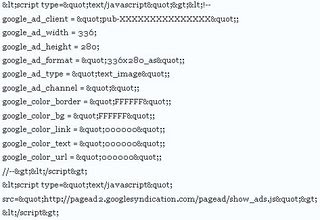
If you are lazy to do it, you can parse the AdSense Code at BlogCrowds.com. BlogCrowds.com offer free parse code service.
Parse Your AdSense Code:
http://www.blogcrowds.com/resources/parse_html.php
Step 2:
Placement of the AdSense Ads your posts:
Expand your blog's widget first and find for the code below:
i) Place the Ads Next to your posts:
ii) Place the Ads after your posts:
Paste the parsed AdSense Code at the place you want the Ads to appear. Then, Save the template.
After doing all the steps above, the AdSense Ads will appear in your posts area. The steps mentioned above is only applicable to Blogger.com Customize Template.
Some people said that it is against the AdSense Polices to modified the AdSense Code but I already asked Google about this modification. They said it is OK to make minimal modification to place AdSense into Blogger.com template.
*** Below is the reply from Google AdSense Team ***
" Thanks for your email. We do permit minor edits to the AdSense code to
allow AdSense to be placed into Blogger.
Please keep in mind that in general, publishers are not allowed to alter
the AdSense ad code for any reason. Once you've generated the ad code in
your AdSense account pages, you may not alter any portion of the code or
manually change the layout of the ads. For instance, publishers may not
alter the ad height variable to mask the Ads by Google moniker.
Thanks for your cooperation.
Sincerely,
Sean
The Google AdSense Team
----------------
To access the Google AdSense home page or to log in to your account,
please visit: https://www.google.com/adsense
Original Message Follows:
Can I change the original AdSense Code to the code above so that I can
place it into Blogger XML template? "
Related Links:


